


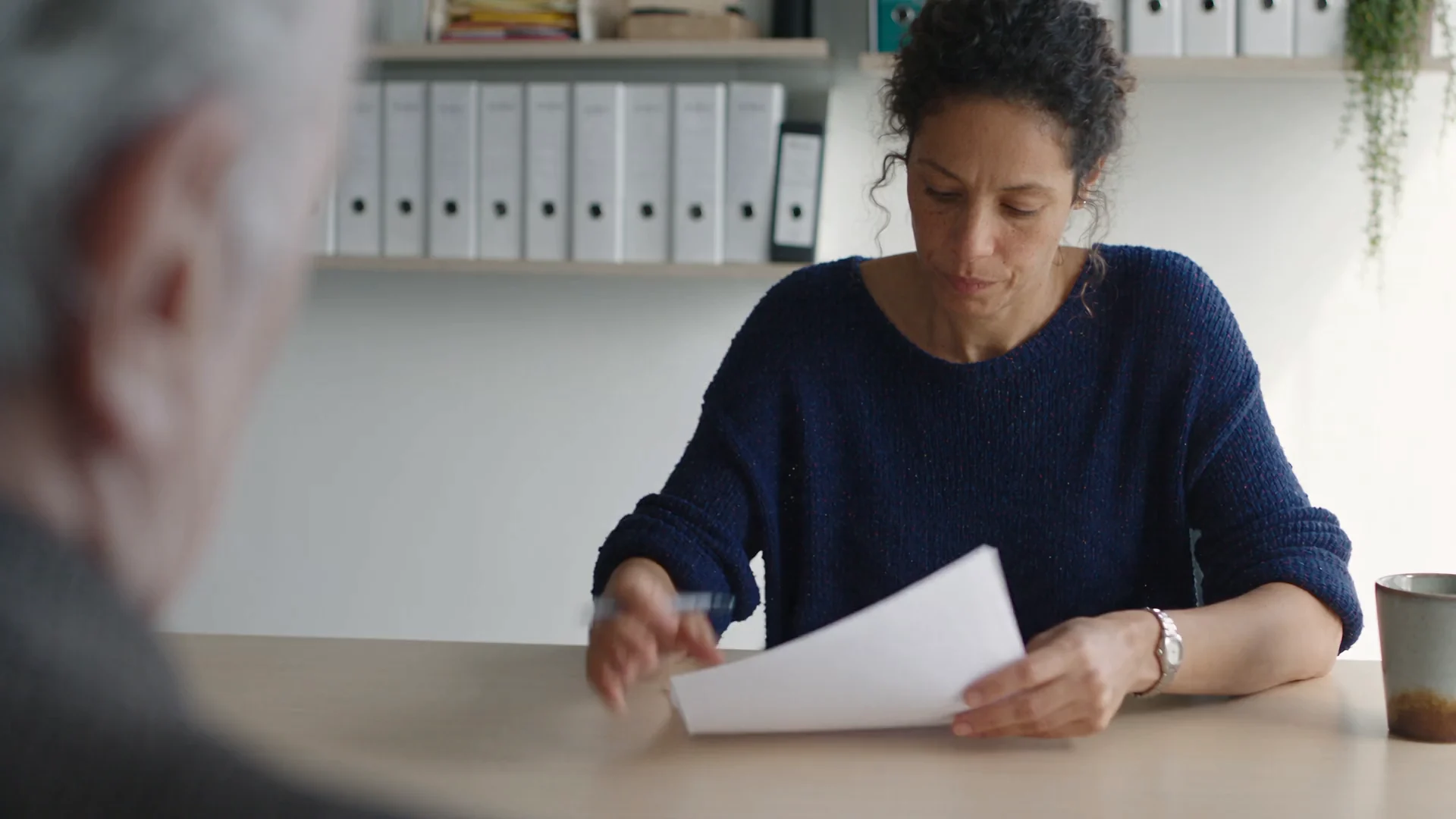
Film a planning conversation
Film a few seconds of advice being given, handheld, in daylight.
Video
Connect once, from a computer.
Ask ChatGPT or Claude for an infographic, carousel or short film. Media Studio makes it, puts infographics and carousels in your brand, and saves it for your team.
Invited pilot for client teams. Request access
Fiducial MCP adds a connector called Fiducial Media Studio.
On the web, open Plugins, select +, then Add custom MCP server. Name it Fiducial Media Studio, paste the URL under Connection and choose OAuth. On ChatGPT Business, only an admin or owner can add it.
https://app.fiducial.ai/api/mcpRead the risk warning, tick I understand and want to continue, then select Create as a plugin. Install it and sign in to Fiducial when ChatGPT asks.
Select Fiducial Media Studio with @ in a conversation and ask for an image, an infographic or a video.
Brief the work in ChatGPT. It chooses the Media Studio workflow, Media Studio makes the piece, and the result comes back into the conversation.
I’ll lay your five steps out as a draft, check the wording with you, then render the page.
 Fiducialgenerated with MCP
Use Fiducial Media Studio to make an infographic: five steps to your first financial plan. One winding path up a hill with the steps as numbered milestones. Bright coral, yellow and teal. Use only my wording and do not add figures.
The infographic is ready, with your five steps word for word. It is saved in Media Studio.
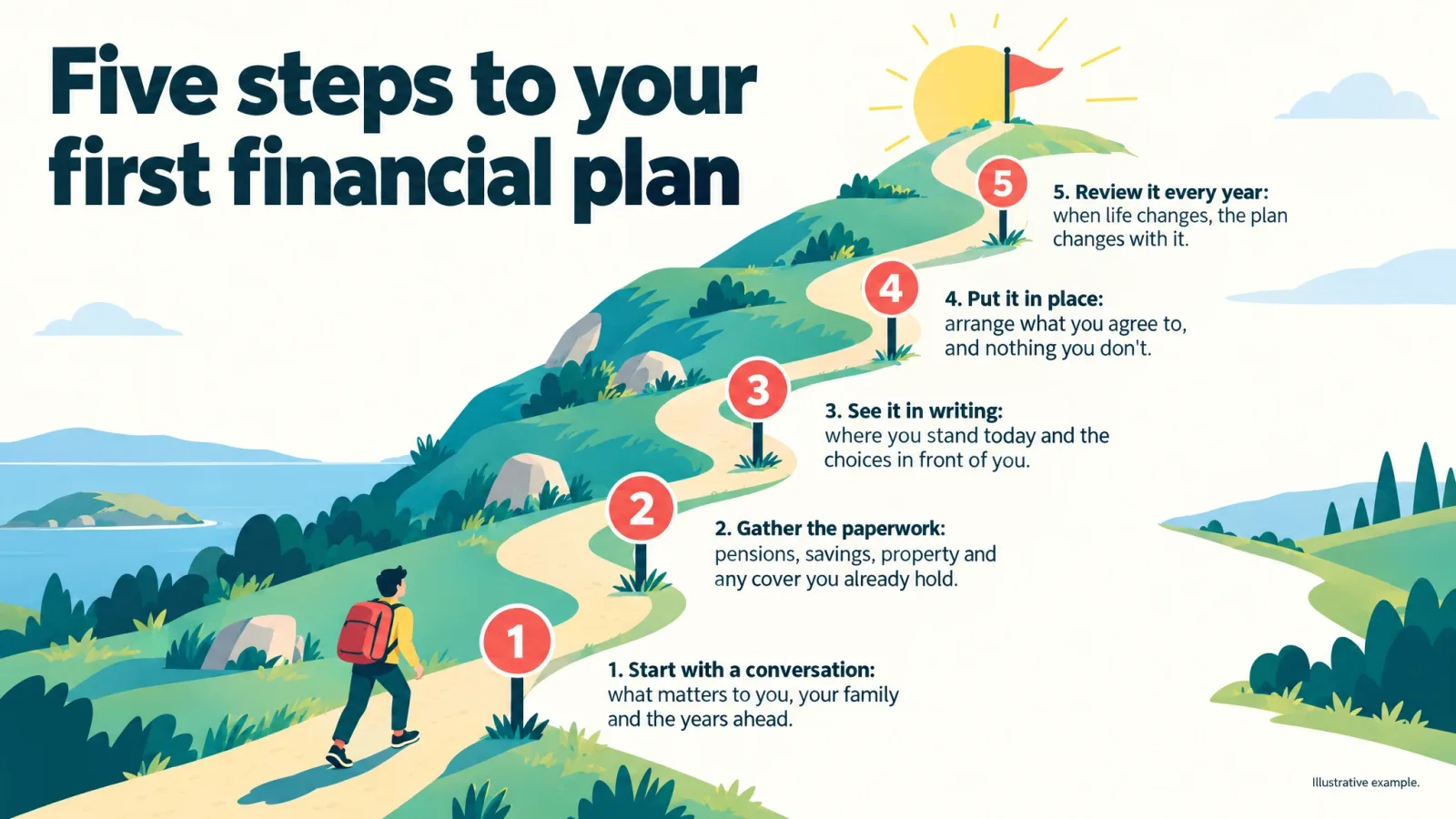
Five steps to your first financial plan
Infographic
Start from a brief that already works, add your own details, and let your assistant choose the workflow.
Film a planning conversation
Film a few seconds of advice being given, handheld, in daylight.
Video

Shoot a cover for a retirement guide
Photograph a retirement guide cover with room for the headline.
Image
Explain five steps to a financial plan
Turn your own five steps into one bright page.
Infographic

Storyboard the keys to a first home
Plan a short film about a first home in six shots.
Storyboard
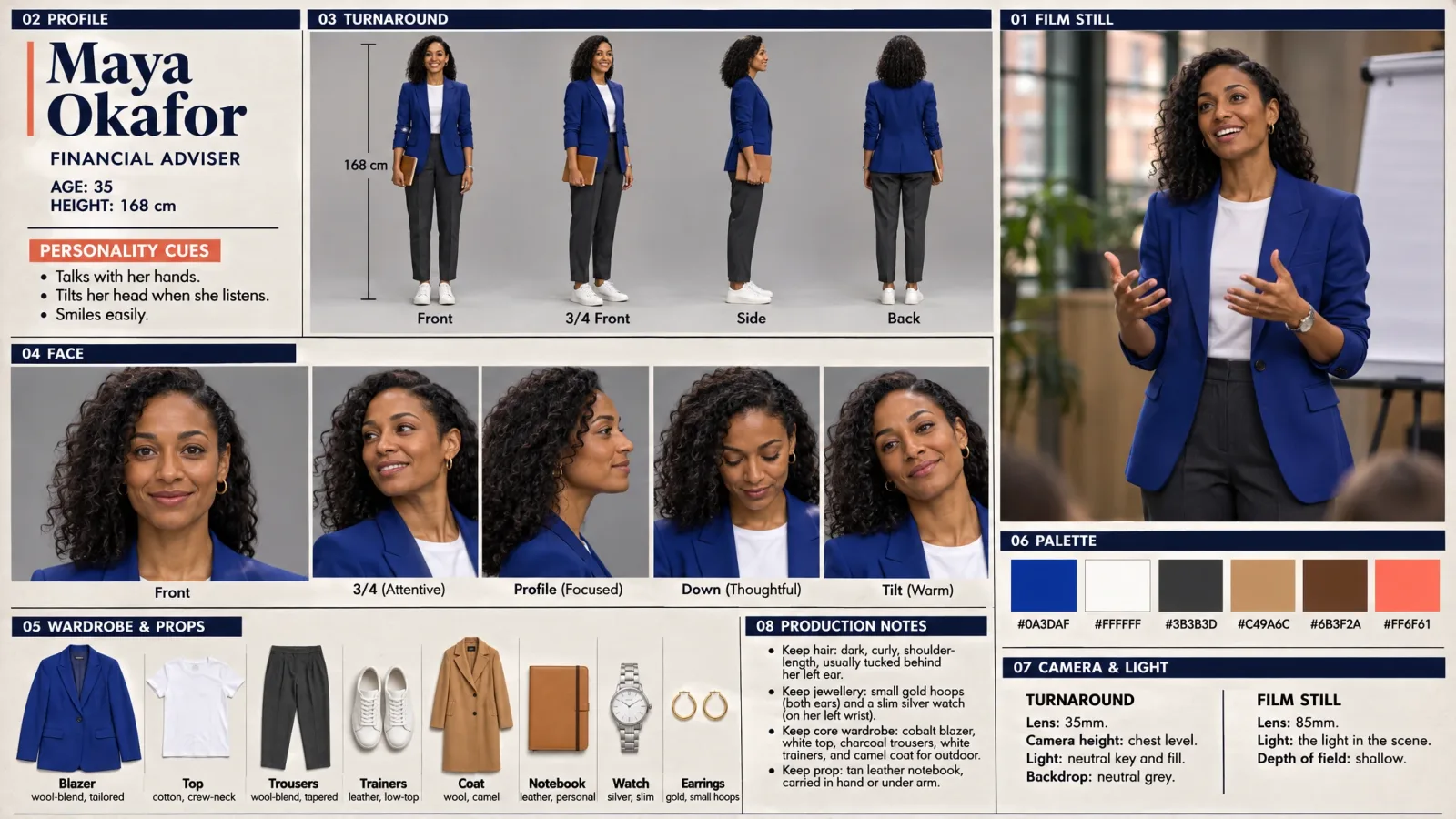
Build a character sheet for an adviser
Put a recurring adviser on one sheet you can attach to later scenes.
Character sheet

Photograph a florist opening up
Show a client’s small business at the start of its day.
Image
Describe what you need and Media Studio returns the finished piece to your conversation. No tabs to switch and nothing to copy across.
Photographs, guide covers and campaign pictures from a description, with GPT Image or Nano Banana. Ask for a change or another size and it joins the same creation.
Make a documentary photograph of a florist setting out tulips in front of her shop in the morning.
Fiducialgenerated imageDescribe a shot, or hand over an image to animate, and get a clip back with Seedance or Wan.
Film a couple walking a clifftop path on a bright morning, handheld from behind. Five seconds.
Fiducialgenerated video
Paste the approved wording and get an infographic or a 6-page LinkedIn carousel. Your team’s brand kit can supply the colours, type and logo, and you approve the draft before anything is rendered.
Make an infographic that explains what an ETF is. Use only this wording.
Fiducialgenerated infographic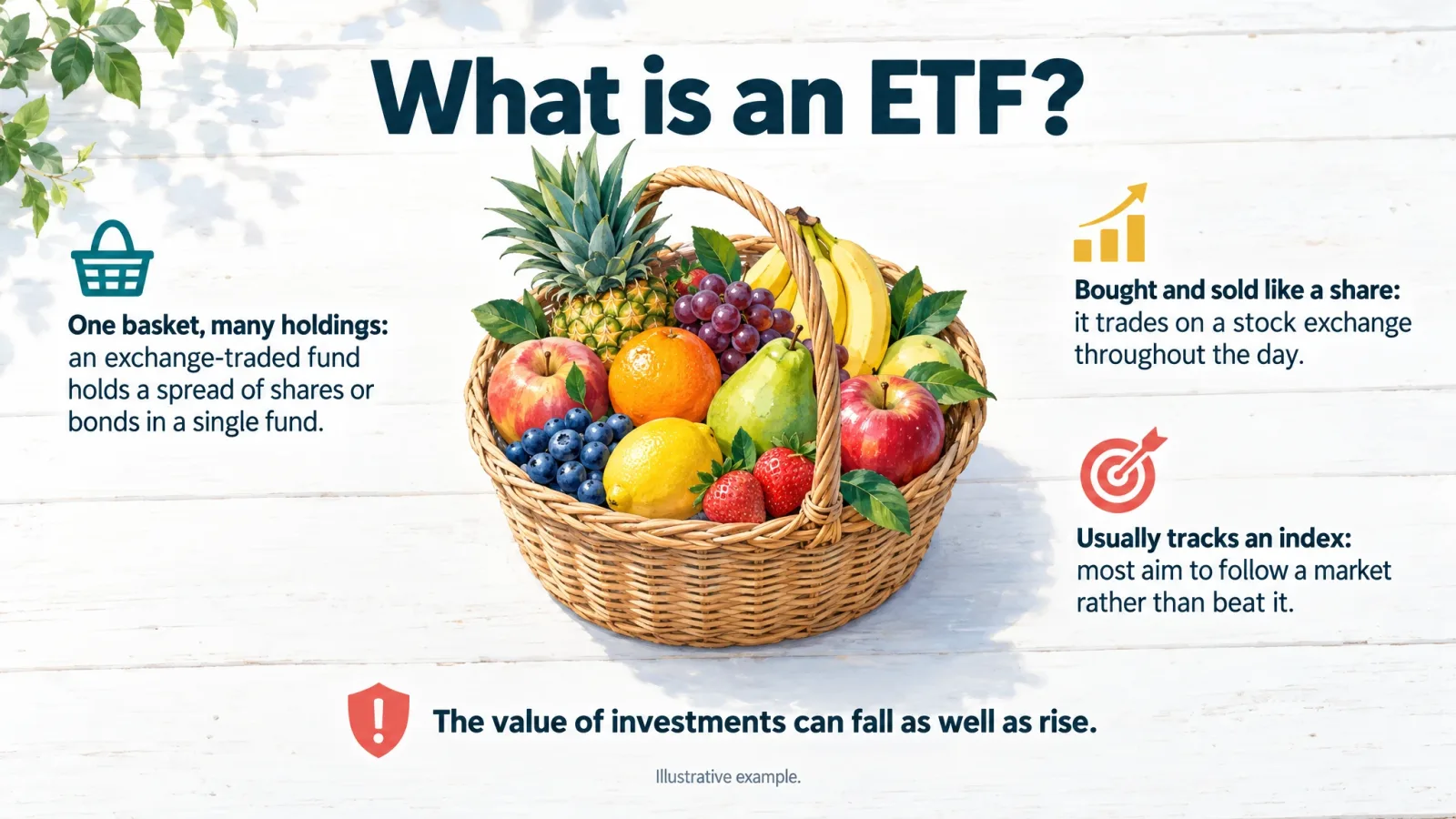
Plan a film on one storyboard sheet, pull any panel out as a full frame, and keep one person consistent with a character sheet you can attach to later scenes.
Storyboard the day a couple get the keys to their first home, in six shots.
Fiducialgenerated storyboardIn your assistant
Paste one link into your assistant, ask for an infographic in your approved wording, a short film or a carousel, and the result comes back into the conversation.
https://app.fiducial.ai/api/mcpYou sign in with your Fiducial account; we open the pilot for each client’s team. Request access
Explain what an ETF is for our LinkedIn page: an infographic in our approved wording, and a 5-second opener film.
Used FiducialInfographic, Video
What is an ETF?Infographic · 16:9ReadyA planning conversationVideo · 5s · 16:9ReadyBoth are saved in Media Studio. The infographic keeps your wording exactly, so open it there to check before you post.
Each workflow has a default model, or you can name one. The list follows what your team has enabled.
Sample work made in Media Studio for financial-services briefs: topics like ETFs, retirement and first homes, turned into clear client-facing visuals.

Portrait of an adviser
Image
A walk on the coast path
Video
A florist opening up
Image
A planning conversation
Video
A cover for a retirement guide
Image

A first-home savings guide
Image
Fiducial MCP is a remote MCP (Model Context Protocol) server that connects your AI assistant to Media Studio, Fiducial’s AI marketing studio. Your assistant can then make the images, infographics, storyboards and video that explain your products and services, and bring each result back into the conversation.
Fiducial MCP is an invited pilot for Fiducial clients. We open it for each client’s team, and each person signs in with their own Fiducial account. There is no self-service sign-up: request access and we will be in touch.
Each generation through Fiducial MCP is charged to your team’s credits at the same price as in Media Studio. Your assistant can read the prices and your balance before it starts, and a request can carry a credit ceiling.
On Claude Team or Enterprise, an Owner adds the connector once under Organization settings › Connectors, and each person then connects with their own sign-in. In ChatGPT, custom MCP servers are available on Business, Enterprise and Edu plans. On ChatGPT Business, only an admin or owner can add one; on Enterprise or Edu, admins can also let selected members add one. Claude Code and Codex need no admin step.
Fiducial MCP is not listed in the ChatGPT or Claude directories, so you add it by its URL. Add https://app.fiducial.ai/api/mcp to your assistant as a custom MCP server or connector, sign in with your Fiducial account and approve the connection. You can disconnect an assistant at any time from your Fiducial account.
Fiducial MCP connects to ChatGPT, Claude and Claude Desktop, Claude Code, Codex, Cursor, VS Code with GitHub Copilot, Gemini CLI, Devin Desktop, Zed, Cline, Goose, Le Chat, Microsoft Copilot Studio, Perplexity and OpenCode. The steps for each follow its current documentation and are at the top of this page.
Every result is saved in Media Studio, and your assistant gives you a link that opens it there. New work is private to you unless your team has team projects; there you choose between the shared From AI assistants project and My AI creations, which only you can see.
Fiducial MCP makes images, video from a prompt or an image, storyboards, character sheets, infographics and LinkedIn carousels. It can also edit the text on an infographic or carousel, make another size of an image, make a video sharper or larger and send results to your Gallery.
No, Fiducial MCP does not use API keys. Each person signs in with their own Fiducial account, so work is made in their name and nothing is shared through a common key.
Request access and we will open Fiducial MCP for your team. If your team is already in the pilot, connect your assistant now.